Remote method invocation allows applications to call object methods located remotely, sharing resources and processing load across systems. Unlike other systems for remote execution which require that only simple data types or defined structures be passed to and from methods, RMI allows any Java object type to be used - even if the client or server has never encountered it before. RMI allows both client and server to dynamically load new object types as required.
Showing posts with label rmi. Show all posts
Showing posts with label rmi. Show all posts
Sunday, 17 April 2011

Friday, 4 March 2011
RMI and CORBA
Java RMI is a mechanism that allows one to invoke a method on an object that exists in another address space. The other address space could be on the same machine or a different one. The RMI mechanism is basically an object-oriented RPC mechanism. CORBA is another object-oriented RPC mechanism. CORBA differs from Java RMI in a number of ways:
This tutorial attempts to show the essence of RMI, without discussing any extraneous features. Sun has provided a Guide to RMI, but it includes a lot of material that is not relevant to RMI itself. For example, it discusses how to incorporate RMI into an Applet, how to use packages and how to place compiled classes in a different directory than the source code. All of these are interesting in themselves, but they have nothing at all to do with RMI. As a result, Sun's guide is unnecessarily confusing. Moreover, Sun's guide and examples omit a number of details that are important for RMI.
There are three processes that participate in supporting remote method invocation.
- CORBA is a language-independent standard.
- CORBA includes many other mechanisms in its standard (such as a standard for TP monitors) none of which are part of Java RMI.
- There is also no notion of an "object request broker" in Java RMI.
This tutorial attempts to show the essence of RMI, without discussing any extraneous features. Sun has provided a Guide to RMI, but it includes a lot of material that is not relevant to RMI itself. For example, it discusses how to incorporate RMI into an Applet, how to use packages and how to place compiled classes in a different directory than the source code. All of these are interesting in themselves, but they have nothing at all to do with RMI. As a result, Sun's guide is unnecessarily confusing. Moreover, Sun's guide and examples omit a number of details that are important for RMI.
There are three processes that participate in supporting remote method invocation.
- The Client is the process that is invoking a method on a remote object.
- The Server is the process that owns the remote object. The remote object is an ordinary object in the address space of the server process.
- The Object Registry is a name server that relates objects with names. Objects are registered with the Object Registry. Once an object has been registered, one can use the Object Registry to obtain access to a remote object using the name of the object.
Thursday, 3 March 2011
Rmi : The concept and terminologies
In the last article, we saw Objects which have to be made available to other machines have to be exported to something called a Remote Registry Server so that they can be invoked. So if Machine A wants to call methods of some object on Machine B, then Machine B would have to export that object on its Remote Registry Server. Remote Registry Server is a service that runs on the server and helps client’s search and access objects on the server remotely. Now, if an object has to be capable of being exported then it must implement the Remote Interface present in the RMI package. For example, say that you want an object Xyz on machine A to be available for remote method invocation, then it must implement the Remote interface.
RMI uses something called a stub and a skeleton. The stub is present on the client side, and the skeleton the server side. When you call remote methods, you don't just go directly to other machine and say "hey, here's the method name, here are the parameters, just give me back what has to be returned and I am out of here".
There are a number of events that have to take place beforehand which help in the communication of the data. The stub is like a local object on the client side, which acts like a proxy of the object on the server side. It provides the methods to the client which can be invoked on the server. The Stub then sends the method call to the Skeleton, which is present on the server side. The Skeleton then implements the method on the server side.
The Stub and the Skeleton communicate with each other through something called a Remote Reference Layer. This layer gives the stub and skeleton the capability to send data using the TCP/IP protocol. Let's take a quick look at a simple technique called "Binding".
Whenever a client wants to make a reference to any object on the server, have you thought how he would tell the server what object he wants to create? Well, this is where this concept of "Binding" comes in. On the server end we associate a string variable with an object (we have methods to do this. We will learn more about these when we start coding). The client tells the server what object he wants to create by passing that string to the server, thus letting the server know exactly what object you are talking about. All of these strings and objects are stored in the Remote Registry Server on the server.
RMI uses something called a stub and a skeleton. The stub is present on the client side, and the skeleton the server side. When you call remote methods, you don't just go directly to other machine and say "hey, here's the method name, here are the parameters, just give me back what has to be returned and I am out of here".
There are a number of events that have to take place beforehand which help in the communication of the data. The stub is like a local object on the client side, which acts like a proxy of the object on the server side. It provides the methods to the client which can be invoked on the server. The Stub then sends the method call to the Skeleton, which is present on the server side. The Skeleton then implements the method on the server side.
The Stub and the Skeleton communicate with each other through something called a Remote Reference Layer. This layer gives the stub and skeleton the capability to send data using the TCP/IP protocol. Let's take a quick look at a simple technique called "Binding".
Whenever a client wants to make a reference to any object on the server, have you thought how he would tell the server what object he wants to create? Well, this is where this concept of "Binding" comes in. On the server end we associate a string variable with an object (we have methods to do this. We will learn more about these when we start coding). The client tells the server what object he wants to create by passing that string to the server, thus letting the server know exactly what object you are talking about. All of these strings and objects are stored in the Remote Registry Server on the server.
Remote method invocation allows applications to call object methods located remotely, sharing resources and processing load across systems. Unlike other systems for remote execution which require that only simple data types or defined structures be passed to and from methods, RMI allows any Java object type to be used - even if the client or server has never encountered it before. RMI allows both client and server to dynamically load new object types as required.
Consider the follow scenario :
Figure 1 shows the connections made by the client when using RMI. Firstly, the client must contact an RMI registry, and request the name of the service. Developer B won't know the exact location of the RMI service, but he knows enough to contact Developer A's registry. This will point him in the direction of the service he wants to call..
Developer A's service changes regularly, so Developer B doesn't have a copy of the class. Not to worry, because the client automatically fetches the new subclass from a webserver where the two developers share classes. The new class is loaded into memory, and the client is ready to use the new class. This happens transparently for Developer B - no extra code need to be written to fetch the class.
We have to declare a default constructor, even when we don't have any initialization code for our service. This is because our default constructor can throw a java.rmi.RemoteException, from its parent constructor in UnicastRemoteObject. Sound confusing? Don't worry, because our constructor is extremely simple.
public PowerServiceServer () throws RemoteException
{
super();
}
Our implementation of the service also needs to have a main method. The main method will be responsible for creating an instance of our PowerServiceServer, and registering (or binding) the service with the RMI Registry. Our main method will also assign a security manager to the JVM, to prevent any nasty surprises from remotely loaded classes. In this case, a security manager isn't really needed, but in more complex systems where untrusted clients will be using the service, it is critical.
public static void main ( String args[] ) throws Exception
{
// Assign a security manager, in the event that dynamic
// classes are loaded
if (System.getSecurityManager() == null)
System.setSecurityManager ( new RMISecurityManager() );
// Create an instance of our power service server ...
PowerServiceServer svr = new PowerServiceServer();
// ... and bind it with the RMI Registry
Naming.bind ("PowerService", svr);
System.out.println ("Service bound....");
}
Once the square and power methods are added, our server is complete. Here's the full source code for the PowerServiceServer.
Our client must first assign a security manager, and then obtain a reference to the service. Note that the client receives an instance of the interface we defined earlier, and not the actual implementation. Some behind-the-scenes work is going on, but this is completely transparent to the client.
// Assign security manager
if (System.getSecurityManager() == null)
{
System.setSecurityManager (new RMISecurityManager());
}
// Call registry for PowerService
PowerService service = (PowerService) Naming.lookup
("rmi://" + args[0] + "/PowerService");
To identify a service, we specify an RMI URL. The URL contains the hostname on which the service is located, and the logical name of the service. This returns a PowerService instance, which can then be used just like a local object reference. We can call the methods just as if we'd created an instance of the remote PowerServiceServer ourselves.
System.out.println ("Answer : " + service.power(value,power));
Writing RMI clients is the easiest part of building distributed services. In fact, there's more code for the user interface menu in the client than there is for the RMI components! To keep things simple, there's no data validation, so be careful when entering numbers. Here's the full source code for the RMI client.
You can download all the source and class files together as a single ZIP file. Unpack the files into a directory, and then perform the following steps.
Overview
Remote Method Invocation (RMI) facilitates object function calls between Java Virtual Machines (JVMs). JVMs can be located on separate computers - yet one JVM can invoke methods belonging to an object stored in another JVM. Methods can even pass objects that a foreign virtual machine has never encountered before, allowing dynamic loading of new classes as required. This is a powerful feature!Consider the follow scenario :
- Developer A writes a service that performs some useful function. He regularly updates this service, adding new features and improving existing ones.
- Developer B wishes to use the service provided by Developer A. However, it's inconvenient for A to supply B with an update every time.
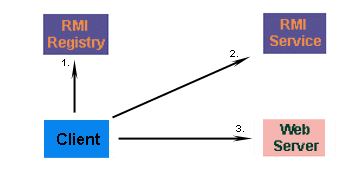 |
| Figure 1 - Connections made when client uses RMI |
Developer A's service changes regularly, so Developer B doesn't have a copy of the class. Not to worry, because the client automatically fetches the new subclass from a webserver where the two developers share classes. The new class is loaded into memory, and the client is ready to use the new class. This happens transparently for Developer B - no extra code need to be written to fetch the class.
Writing RMI services
Writing your own RMI services can be a little difficult at first, so we'll start off with an example which isn't too ambitious. We'll create a service that can calculate the square of a number, and the power of two numbers (238 for example). Due to the large size of the numbers, we'll use the java.math.BigInteger class for returning values rather than an integer or a long.Writing an interface
The first thing we need to do is to agree upon an interface, An interface is a description of the methods we will allow remote clients to invoke. Let's consider exactly what we'll need.- A method that accepts as a parameter an integer, squares it, and returns a BigInteger
public BigInteger square ( int number_to_square ); - A method that accepts as a parameter two integers, calculates their power, and returns a BigInteger
public BigInteger power ( int num1, int num2 );
import java.math.BigInteger;Our interface extends java.rmi.Remote, which indicates that this is a remote service. We provide method definitions for our two methods (square and power), and the interface is complete. The next step is to implement the interface, and provide methods for the square and power functions.
import java.rmi.*;
//
// PowerService Interface
//
// Interface for a RMI service that calculates powers
//
public interface PowerService extends java.rmi.Remote
{
// Calculate the square of a number
public BigInteger square ( int number )
throws RemoteException;
// Calculate the power of a number
public BigInteger power ( int num1, int num2)
throws RemoteException;
}
Implementing the interface
Implementing the interface is a little more tricky - we actually have to write the square and power methods! Don't worry if you're not sure how to calculate squares and powers, this isn't a math lesson. The real code we need to be concerned about is the constructor and main method.We have to declare a default constructor, even when we don't have any initialization code for our service. This is because our default constructor can throw a java.rmi.RemoteException, from its parent constructor in UnicastRemoteObject. Sound confusing? Don't worry, because our constructor is extremely simple.
public PowerServiceServer () throws RemoteException
{
super();
}
Our implementation of the service also needs to have a main method. The main method will be responsible for creating an instance of our PowerServiceServer, and registering (or binding) the service with the RMI Registry. Our main method will also assign a security manager to the JVM, to prevent any nasty surprises from remotely loaded classes. In this case, a security manager isn't really needed, but in more complex systems where untrusted clients will be using the service, it is critical.
public static void main ( String args[] ) throws Exception
{
// Assign a security manager, in the event that dynamic
// classes are loaded
if (System.getSecurityManager() == null)
System.setSecurityManager ( new RMISecurityManager() );
// Create an instance of our power service server ...
PowerServiceServer svr = new PowerServiceServer();
// ... and bind it with the RMI Registry
Naming.bind ("PowerService", svr);
System.out.println ("Service bound....");
}
Once the square and power methods are added, our server is complete. Here's the full source code for the PowerServiceServer.
import java.math.*;
import java.rmi.*;
import java.rmi.server.*;

//
// PowerServiceServer
//
// Server for a RMI service that calculates powers
//
public class PowerServiceServer extends UnicastRemoteObject
implements PowerService
{
    public PowerServiceServer () throws RemoteException
    {
        super();
    }

    // Calculate the square of a number
    public BigInteger square ( int number )
    throws RemoteException
    {
        String numrep = String.valueOf(number);
        BigInteger bi = new BigInteger (numrep);

        // Square the number
        bi.multiply(bi);

        return (bi);
    }

    // Calculate the power of a number
    public BigInteger power ( int num1, int num2)
    throws RemoteException
    {
        String numrep = String.valueOf(num1);
        BigInteger bi = new BigInteger (numrep);

 bi = bi.pow(num2);
 return bi;
    }

    public static void main ( String args[] ) throws Exception
    {
        // Assign a security manager, in the event that dynamic
 // classes are loaded
        if (System.getSecurityManager() == null)
            System.setSecurityManager ( new RMISecurityManager() );

        // Create an instance of our power service server ...
        PowerServiceServer svr = new PowerServiceServer();

        // ... and bind it with the RMI Registry
        Naming.bind ("PowerService", svr);

        System.out.println ("Service bound....");
    }
}
Writing a RMI client
What good is a service, if you don't write a client that uses it? Writing clients is the easy part - all a client has to do is call the registry to obtain a reference to the remote object, and call its methods. All the underlying network communication is hidden from view, which makes RMI clients simple.Our client must first assign a security manager, and then obtain a reference to the service. Note that the client receives an instance of the interface we defined earlier, and not the actual implementation. Some behind-the-scenes work is going on, but this is completely transparent to the client.
// Assign security manager
if (System.getSecurityManager() == null)
{
System.setSecurityManager (new RMISecurityManager());
}
// Call registry for PowerService
PowerService service = (PowerService) Naming.lookup
("rmi://" + args[0] + "/PowerService");
To identify a service, we specify an RMI URL. The URL contains the hostname on which the service is located, and the logical name of the service. This returns a PowerService instance, which can then be used just like a local object reference. We can call the methods just as if we'd created an instance of the remote PowerServiceServer ourselves.
// Call remote method// Call remote method
System.out.println ("Answer : " + service.square(value));
System.out.println ("Answer : " + service.power(value,power));
Writing RMI clients is the easiest part of building distributed services. In fact, there's more code for the user interface menu in the client than there is for the RMI components! To keep things simple, there's no data validation, so be careful when entering numbers. Here's the full source code for the RMI client.
import java.rmi.*;
import java.rmi.Naming;
import java.io.*;

//
//
// PowerServiceClient
//
//
public class PowerServiceClient
{
 public static void main(String args[]) throws Exception
 {
  // Check for hostname argument
  if (args.length != 1)
  {
   System.out.println
   ("Syntax - PowerServiceClient host");
   System.exit(1);
  }

  // Assign security manager
  if (System.getSecurityManager() == null)
  {
   System.setSecurityManager
   (new RMISecurityManager());
  }

  // Call registry for PowerService
  PowerService service = (PowerService) Naming.lookup
   ("rmi://" + args[0] + "/PowerService");

  DataInputStream din = new
   DataInputStream (System.in);

  for (;;)
  {
   System.out.println
     ("1 - Calculate square");
   System.out.println
     ("2 - Calculate power");
   System.out.println
     ("3 - Exit"); System.out.println();
   System.out.print ("Choice : ");

   String line = din.readLine();
   Integer choice = new Integer(line);

   int value = choice.intValue();

   switch (value)
   {
   case 1:
     System.out.print ("Number : ");
     line = din.readLine();System.out.println();
     choice = new Integer (line);
     value  = choice.intValue();

     // Call remote method
     System.out.println
     ("Answer : " + service.square(value));

     break;
   case 2:
     System.out.print ("Number : ");
     line = din.readLine();
     choice = new Integer (line);
     value  = choice.intValue();

     System.out.print ("Power  : ");
     line = din.readLine();
     choice = new Integer (line);
     int power = choice.intValue();

     // Call remote method
     System.out.println
  ("Answer : " + service.power(value, power));

     break;
   case 3:
     System.exit(0);
   default :
     System.out.println ("Invalid option");
   break;
   }
  }
 }

}
Running the client and server
Our example was extremely simple. More complex systems, however, might contain interfaces that change, or whose implementation changes. To run this article's examples, both the client and server will have a copy of the classfiles, but more advanced systems might share the code of the server on a webserver, for downloading as required. If your systems do this, don't forget to set the system property java.rmi.server.codebase to the webserver directory in which your classes are stored!You can download all the source and class files together as a single ZIP file. Unpack the files into a directory, and then perform the following steps.
Start the rmiregistry
To start the registry, Windows users should do the following (assuming that your java\bin directory is in the current path):-start rmiregistry
To start the registry, Unix users should do the following:-
rmiregistry &-
Compile the server
Compile the server, and use thermictool to create stub files. Start the server
From the directory in which the classes are located, type the following:-java PowerServiceServer
Start the client
You can run the client locally, or from a different machine. In either case, you'll need to specify the hostname of the machine where you are running the server. If you're running it locally, use localhost as the hostname.java PowerServiceClient localhost
| TIP - If you running the client or server with JDK1.2, then you'll need to change the security settings. You'll need to specify a security policy file (a sample is included with the source code and classes) when you run the client and server.The following changes should be made when running the server java -Djava.security.policy=java.policy PowerServiceServer The following changes should be made when running the client java -Djava.security.policy=java.policy PowerServiceClient localhost |
Summary
Java RMI is a useful mechanism for invoking methods of remote objects. Java RMI allows one Java Virtual Machine to invoke methods of another, and to share any Java object type, even if client or server has never come across that object type before.
Subscribe to:
Comments (Atom)