Showing posts with label jpa / java persistence api. Show all posts

Sunday, 8 May 2011

Benefits of JPA over Hibernate API

There are couple of benefits of using JPA instead of hibernate, to highlight some:
  • By using the hibernate API, we are kind of bound to particular vendor. What if in future we want to use TOPLink for some particular reason, so we have to change our code a lot. But when we are using JPA, we can introduce an ORM in our project without directly depending on some particular ORM.
  • Changing from one ORM to another won't effect our DAO classes much, since we are using a standard API.

So we can use any ORM like hibernate, TOPLink. However it doesn't mean we shouldn't use hibernate. If hibernate meets your requirements use it by all means, but giving JPA more control and use hibernate for what JPA doesn't supports right now.

Using JPA instead of Hibernate

In JPA, the names of the interfaces are different from Hibernate. Most of the developers of hibernate, worked for JPA as well. So logically they are quite similar. To look at some:
  • ORM's persistence context is called Session in Hibernate and in JPA it is called EntityManager. So Session <-> EntityManager
  • SessionFactory is called EntityManagerFactory

See benefits of JPA over hibernate for more.

Entity in ORM

Entity is the persistence (POJO) objects that represent one record in the table. The Entity is simple annoted POJO class, which is easy to develop. Here are the characteristics of an Entity:
  1. Entity can be persisted to the relational database
  2. Entity is identified by persistence identity (the primary key of the table)
  3. Entity supports transactions
  4. Entity supports inheritance
Example consider this class:
class MobileEntity{

private String model;
private String manufacturer;
private Double price;
private String imeiNo;

…..
// Getters and Setters go here.
}
See Entity in JPA.

Saturday, 26 March 2011

JPA : Persistence unit

The EntityManager is created by the EntitiyManagerFactory which is configured by the persistence unit. The persistence unit is described via the file "persistence.xml" in the directory META-INF in the source folder. A set of entities which are logical connected will be grouped via a persistence unit. "persistence.xml" defines the connection data to the database, e.g. the driver, the user and the password,

JPA 2.0 with EclipseLink

This tutorial explains how to use EclipseLink, the reference implementation for the Java Persistence API (JPA). The usage of EclipseLink is demonstrated for stand-aloneJava applications (outside the Java EE environment). The JPA 2.0 implementation was used for this tutorial.

Table of Contents 

JPA

JPA resoures for eclipse link

http://www.eclipse.org/eclipselink/ EclipseLink
http://java.sun.com/developer/technicalArticles/J2SE/Desktop/persistenceapi/ Using the Java Persistence API in Desktop Applications
http://www.ibm.com/developerworks/java/library/j-typesafejpa/index.html Dynamic, typesafe queries in JPA 2.0 using the Criteria API

JPA : Relationship Example using eclipse link

Create a Java project "com.vaani.jpa.eclipselink", create again a folder "lib" and place the required JPA jars and derby.jar into this folder. Add the libs to the project classpath.
Create the package "com.vaani.jpa.eclipselink.model" and the following classes.
import java.util.ArrayList;
import java.util.List;

import javax.persistence.Entity;
import javax.persistence.GeneratedValue;
import javax.persistence.GenerationType;
import javax.persistence.Id;
import javax.persistence.OneToMany;

@Entity
public class Family {
@Id
@GeneratedValue(strategy = GenerationType.TABLE)
private int id;
private String description;

@OneToMany(mappedBy = "family")
private final List<Person> members = new ArrayList<Person>();

public int getId() {
return id;
}

public void setId(int id) {
this.id = id;
}

public String getDescription() {
return description;
}

public void setDescription(String description) {
this.description = description;
}

public List<Person> getMembers() {
return members;
}

}


import java.util.ArrayList;
import java.util.List;

import javax.persistence.Entity;
import javax.persistence.GeneratedValue;
import javax.persistence.GenerationType;
import javax.persistence.Id;
import javax.persistence.ManyToOne;
import javax.persistence.OneToMany;
import javax.persistence.Transient;

@Entity
public class Person {
@Id
@GeneratedValue(strategy = GenerationType.TABLE)
private String id;
private String firstName;
private String lastName;

private Family family;

private String nonsenseField = "";

private List<Job> jobList = new ArrayList<Job>();

public String getId() {
return id;
}

public void setId(String Id) {
this.id = Id;
}

public String getFirstName() {
return firstName;
}

public void setFirstName(String firstName) {
this.firstName = firstName;
}

// Leave the standard column name of the table
public String getLastName() {
return lastName;
}

public void setLastName(String lastName) {
this.lastName = lastName;
}

@ManyToOne
public Family getFamily() {
return family;
}

public void setFamily(Family family) {
this.family = family;
}

@Transient
public String getNonsenseField() {
return nonsenseField;
}

public void setNonsenseField(String nonsenseField) {
this.nonsenseField = nonsenseField;
}

@OneToMany
public List<Job> getJobList() {
return this.jobList;
}

public void setJobList(List<Job> nickName) {
this.jobList = nickName;
}

}


import javax.persistence.Entity;
import javax.persistence.GeneratedValue;
import javax.persistence.GenerationType;
import javax.persistence.Id;

@Entity
public class Job {
@Id
@GeneratedValue(strategy = GenerationType.TABLE)
private int id;
private double salery;
private String jobDescr;

public int getId() {
return id;
}

public void setId(int id) {
this.id = id;
}

public double getSalery() {
return salery;
}

public void setSalery(double salery) {
this.salery = salery;
}

public String getJobDescr() {
return jobDescr;
}

public void setJobDescr(String jobDescr) {
this.jobDescr = jobDescr;
}

}


Create the file "persistence.xml" in "src/META-INF". Remember to change the path to the database.

<?xml version="1.0" encoding="UTF-8" ?>
<persistence xmlns:xsi="http://www.w3.org/2001/XMLSchema-instance"
xsi:schemaLocation="http://java.sun.com/xml/ns/persistence http://java.sun.com/xml/ns/persistence/persistence_2_0.xsd"
version="2.0" xmlns="http://java.sun.com/xml/ns/persistence">
<persistence-unit name="people" transaction-type="RESOURCE_LOCAL">


<class>com.vaani.jpa.eclipselink.model.Person</class>
<class>com.vaani.jpa.eclipselink.model.Family</class><class>com.vaani.jpa.eclipselink.model.Job</class>
<properties>
<property name="javax.persistence.jdbc.driver" value="org.apache.derby.jdbc.EmbeddedDriver" />
<property name="javax.persistence.jdbc.url"
value="jdbc:derby:/home/vogella/databases/relationsshipDb;create=true" />
<property name="javax.persistence.jdbc.user" value="test" />
<property name="javax.persistence.jdbc.password" value="test" />

<!-- EclipseLink should create the database schema automatically -->
<property name="eclipselink.ddl-generation" value="create-tables" />
<property name="eclipselink.ddl-generation.output-mode"
value="database" />
</properties>

</persistence-unit>
</persistence>


The following check is implemented as a JUnit Test. The setup() method will create a few test entries. After the test entries are created, they will be read and the one field of the entries is changed and saved to the database.

import static org.junit.Assert.assertTrue;

import javax.persistence.EntityManager;
import javax.persistence.EntityManagerFactory;
import javax.persistence.Persistence;
import javax.persistence.Query;

import org.junit.Before;
import org.junit.Test;

import com.vaani.jpa.eclipselink.model.Family;
import com.vaani.jpa.eclipselink.model.Person;

public class JpaTest {

private static final String PERSISTENCE_UNIT_NAME = "people";
private EntityManagerFactory factory;

@Before
public void setUp() throws Exception {
factory = Persistence.createEntityManagerFactory(PERSISTENCE_UNIT_NAME);
EntityManager em = factory.createEntityManager();

// Begin a new local transaction so that we can persist a new entity
em.getTransaction().begin();

// Read the existing entries
Query q = em.createQuery("select m from Person m");
// Persons should be empty

// Do we have entries?
boolean createNewEntries = (q.getResultList().size() == 0);

// No, so lets create new entries
if (createNewEntries) {
assertTrue(q.getResultList().size() == 0);
Family family = new Family();
family.setDescription("Family for the Knopfs");
em.persist(family);
for (int i = 0; i < 40; i++) {
Person person = new Person();
person.setFirstName("Jim_" + i);
person.setLastName("Knopf_" + i);
em.persist(person);
// First we have to persists the job
// Now persists the new person
family.getMembers().add(person);
em.persist(person);
em.persist(family);
}
}

// Commit the transaction, which will cause the entity to
// be stored in the database
em.getTransaction().commit();

// It is always good practice to close the EntityManager so that
// resources are conserved.
em.close();

}

@Test
public void checkAvailablePeople() {

// Now lets check the database and see if the created entries are there
// Create a fresh, new EntityManager
EntityManager em = factory.createEntityManager();

// Perform a simple query for all the Message entities
Query q = em.createQuery("select m from Person m");

// We should have 40 Persons in the database
assertTrue(q.getResultList().size() == 40);

em.close();
}

@Test
public void checkFamily() {
EntityManager em = factory.createEntityManager();
// Go through each of the entities and print out each of their
// messages, as well as the date on which it was created
Query q = em.createQuery("select f from Family f");

// We should have one family with 40 persons
assertTrue(q.getResultList().size() == 1);
assertTrue(((Family) q.getSingleResult()).getMembers().size() == 40);
em.close();
}

@Test(expected = javax.persistence.NoResultException.class)
public void deletePerson() {
EntityManager em = factory.createEntityManager();
// Begin a new local transaction so that we can persist a new entity
em.getTransaction().begin();
Query q = em
.createQuery("SELECT p FROM Person p WHERE p.firstName = :firstName AND p.lastName = :lastName");
q.setParameter("firstName", "Jim_1");
q.setParameter("lastName", "Knopf_!");
Person user = (Person) q.getSingleResult();
em.remove(user);
em.getTransaction().commit();
Person person = (Person) q.getSingleResult();
// Begin a new local transaction so that we can persist a new entity

em.close();
}
}

Simple example on JPA with eclipse link

Create a Java project "com.vaani.jpa.simple". Create a folder "lib" and place the required JPA jars and derby.jar into this folder. Add the libs to the project classpath.
Afterwards create the package "com.vaani.jpa.simple.model" and create the following classes.
import javax.persistence.Entity;
import javax.persistence.GeneratedValue;
import javax.persistence.GenerationType;
import javax.persistence.Id;

@Entity
public class Todo {
@Id
@GeneratedValue(strategy = GenerationType.IDENTITY)
private Long id;
private String summary;
private String description;

public String getSummary() {
return summary;
}

public void setSummary(String summary) {
this.summary = summary;
}

public String getDescription() {
return description;
}

public void setDescription(String description) {
this.description = description;
}

@Override
public String toString() {
return "Todo [summary=" + summary + ", description=" + description
+ "]";
}

}


Persistence Unit

Create a directory "META-INF" in your "src" folder and create the file "persistence.xml". This examples uses EclipseLink specific flags for example via the parameter "eclipselink.ddl-generation" you specify that the database scheme will be automatically dropped and created.

<?xml version="1.0" encoding="UTF-8" ?>
<persistence xmlns:xsi="http://www.w3.org/2001/XMLSchema-instance"
xsi:schemaLocation="http://java.sun.com/xml/ns/persistence http://java.sun.com/xml/ns/persistence/persistence_2_0.xsd"
version="2.0" xmlns="http://java.sun.com/xml/ns/persistence">
<persistence-unit name="todos" transaction-type="RESOURCE_LOCAL">
<class>com.vaani.jpa.simple.model.Todo</class>
<properties>
<property name="javax.persistence.jdbc.driver" value="org.apache.derby.jdbc.EmbeddedDriver" />
<property name="javax.persistence.jdbc.url"
value="jdbc:derby:/home/vogella/databases/simpleDb;create=true" />
<property name="javax.persistence.jdbc.user" value="test" />
<property name="javax.persistence.jdbc.password" value="test" />

<!-- EclipseLink should create the database schema automatically -->
<property name="eclipselink.ddl-generation" value="create-tables" />
<property name="eclipselink.ddl-generation.output-mode"
value="database" />
</properties>

</persistence-unit>
</persistence>


The database specified via "javax.persistence.jdbc.url" will be automatically created by the Derby Driver. You may want to adjust the path, it currently is based on Linux notations and points to my home directory on my Linux system.

To see the SQL generated for the the databases set eclipselink.ddl-generation.output-mode value from "database" to "sql-script" or "both". Two files will get generated 'createDDL.jdbc' and 'dropDDL.jdbc'

Test your installation

Create the following Main class which will create a new entry every time it it called. After the first call you need to remove the property "eclipselink.ddl-generation" from persistence.xml otherwise you will receive an error as EclipseLink tries to create the database scheme again. Alternative you could set the property to "drop-and-create-tables" but this would drop your database schema at every run.

import java.util.List;

import javax.persistence.EntityManager;
import javax.persistence.EntityManagerFactory;
import javax.persistence.Persistence;
import javax.persistence.Query;

import com.vaani.jpa.simple.model.Todo;

public class Main {
private static final String PERSISTENCE_UNIT_NAME = "todos";
private static EntityManagerFactory factory;

public static void main(String[] args) {
factory = Persistence.createEntityManagerFactory(PERSISTENCE_UNIT_NAME);
EntityManager em = factory.createEntityManager();
// Read the existing entries and write to console
Query q = em.createQuery("select t from Todo t");
List<Todo> todoList = q.getResultList();
for (Todo todo : todoList) {
System.out.println(todo);
}
System.out.println("Size: " + todoList.size());

// Create new todo
em.getTransaction().begin();
Todo todo = new Todo();
todo.setSummary("This is a test");
todo.setDescription("This is a test");
em.persist(todo);
em.getTransaction().commit();

em.close();
}
}


Run you program several times to see that the database is filled.

Installation - Eclipse link and derby for JPA

EclipseLink

Download the EclipseLink implementation from http://www.eclipse.org/eclipselink/downloads/ . The download contains several jars. We need the following jars:
  • eclipselink.jar
  • javax.persistence_2.0.X.jar

Derby Database

The example later will be using Apache Derby as a database. Download Derby from http://db.apache.org/derby/ From this tutorial we will need the "derby.jar". For details on Derby (which is not required for this tutorial) please see Apache Derby .

Relationship Mapping

JPA allows to define relationships between classes, e.g. it can be defined that a class is part of another class (containment). Classes can have one to one, one to many, many to one, and many to many relationships with other classes.
A relationship can be bidirectional or unidirectional, e.g. in a bidirectional relationship both classes store a reference to each other while in an unidirectional case only one class has a reference to the other class. Within a bidirectional relationship you need to specify the owning side of this relationship in the other class with the attribute "mappedBy", e.g. @ManyToMany(mappedBy="attributeOfTheOwningClass".


Relationship annotations
@OneToOne
@OneToMany
@ManyToOne
@ManyToMany

Persistence of fields

The fields of the Entity will be saved in the database. JPA can use either your instance variables (fields) or the corresponding getters and setters to access the fields. You are not allowed to mix both methods. If you want to use the setter and getter methods the Java class must follow the Java Bean naming conventions. JPA persists per default all fields of an Entity, if fields should not be saved they must be marked with @Transient.
By default each field is mapped to a column with the name of the field. You can change the default name via @Column(name="newColumnName").
The following annotations can be used.

 
Annotations for fields / getter and setter
@Id Identifies the unique ID of the database entry
@GeneratedValue Together with ID defines that this value is generated automatically.
@Transient Field will not be saved in database

Friday, 25 March 2011

Entities and Transactions in JPA

All entities have the property of transactionability and their CRUD operations will take place within a transactional context. Transactions can be broadly classified into two types based on who actually owns (or manages) the transaction. They are JTA and Resource-local transaction.

In the case of a J2EE Application, the default transaction type is JTA (Java Transaction API), unless explicitly specified. A method can be simply annotated with @RequiresNew (or @Requires) in which case a new transaction will always started by the container and the transaction completes as soon as the method ends.

Whereas in a J2SE application, the transaction-type defaults to Resource-local, which means that the developer (or the application code) has to explicitly start and end a transaction. It means that the user has to explicitly start a transaction with the help of EntityManager object, and then have to commit it, if everything goes normal, else have to roll-back the transaction if some error occurs.

The following code shows this,

EntityTransaction userTransaction = entityManager.getTransaction();
try{
userTransaction.begin();

// Do something here.

// If everthing goes well, make a commit here.
userTransaction.commit();
}catch(Exception exception){
// Exception has occurred, roll-back the transaction.
userTransaction.rollback();
}


Operations on Entity Objects


The following are the legal operations that can be performed on Entity objects with the help of EntityManager API. As seen previously, EntityManager are objects that manage one or more entity objects with the help of an implicit persistence context.

Persisting Entity Objects:
Entity objects are like regular java objects until they become managed and made persistent by the EntityManager. The following piece of code makes an entity to become persistent and managed.

MobileEntity mobileObject = new MobileEntity();
mobileObject.set()... // Update the state values here.
entityManager.persist(mobileObject);


The persist(entityObject) methods makes the entity persistent in the underlying database and managed within the persistence context of the EntityManager, whether the persistence context is a transaction-scoped or an extended persistence context depends upon how actually the EntityManager was configured.

[What happens when a managed entity is again forced to become managed by calling the persist() method. Or what happens when the persist() method is called couple of times on the same entity object.

Whenever the persist() method is called, the persistence engine will check for the existence of that object with the help of its unique identifier (which is represented in the form of primary key). If any duplicate object is found, then a run-time exception, EntityExistsException will be thrown.]

Querying for Entities:
Developers can either depend on the EntityManager for simple search or Query objects for providing powerful search conditions for locating and querying entity objects.

Using EntityManager object:
Following are the two different methods available in EntityManager interface for querying entity objects and there are some major differences between the two.

Using the EntityManager.find() method:
The find() method takes the class name of the Entity object and the primary key value for locating a single entity object. If the object of interest cannot be located by the EntityManager, then this method will simply return null. The following code illustrates this,

MobileEntity mobile = entityManager.find(MobileEntity.class, “ABC-123”);
If (mobile != null){ // mobile object may or may not be null.
// Process the object.
}


One good thing about the find() method is that, the returned entity object soon becomes managed automatically within the persistence context of the EntityManager.

Using the EntityManager.getReference() method:
This method, like the EntityManager.find() method, takes the name of the entity class and the primary key as their arguments. But the difference is, unlike the find() method which will return null if the entity object is not found, this method will throw an exception EntityNotFFoundException. Another difference between this method and the find() method is that, the entity that is fetched by this method may be lazily loaded. That is, the state of the state of entity (like model, manufacturer, imeiNo may be lazily loaded during the first time it is actually accessed).

MobileEntity mobile = entityManager.getReference(MobileEntity.class, “ABC-123”);
// mobile object may not contain the actual state values for model, manufacturer
// and imei number, the states may be loaded during the first access.

String model = mobile.getModel();
// The persistence engine may fetch the model value for the mobile here
// at this particular point of time.
…..


Using the Query object: Discussed later.

Deleting Entities:
To remove (delete) an entity object from the database, make a call to EntityManager.remove(entityObject) method. The entity object that is passed to the remove() must be a managed entity, else the operation will fail.

Also, making this call may or may-not remove the entity immediately from the database. The algorithm that achieves the same is implementation specific. Some implementation may only mark the entity as a removed entity after this method call, and the actual deletion of the entity object in the database may happen when a flush() operation (which is discussed later) is made.

After this method call, the entity will become detached from the persistence context and it is no longer a managed one.

Updating Entities:
The EntityManager.merge(entityObject) method will make a detached entity to get associated with the current persistence context of the EntityManager. Consider the following lines of code.

// Transaction has begin.
…..
MobileEntity mobile = entityManager.find(MobileEntity.class, “ABC-123”);
…..
// Transaction ends.

mobile.set()…… // Updating the mobile object.

entityManager.merge(mobile);


In the above piece of code, a mobile entity object is located with the EntityManager.find() method. This entity is now in a managed state. Assume that the transaction ends after some point of time and also the persistence context is a transaction-scoped persistence context. As soon as the transaction completes, the persistence context will go off, (since the persistence context is a transaction-scoped persistence context). So the entity object becomes detached from the persistence context. After this any modifications that are made to the mobile object won’t be knowledgeable to the EntityManager as the mobile object has already been detached from it.

Now, calling the merge() method, will make the mobile object becomes managed, and all the recent changes that are made to it will become visible to the current persistence context of the EntityManager.

Flushing and Refreshing:

The EntityManager.flush() will synchronize all the changes that are made to the persistent entities back to the underlying database, whereas the EntityManager.refresh() does the reverse. It will update the entity object with values taken from the database. Any new values that are set to the entity objects will be lost as a result of this method call.

For example, consider the following piece of code,

MobileEntity mobile = …..
mobile.set(); // Update the state values for the mobile object.
….
entityManager.flush();
// Calling this flush method will synchronize the database with the values
// taken from the entity object.
consider this code,


MobileEntity mobile = …
mobile.set(); // The state values for the mobile object is updated.
…..
entityManager.refresh();
// The refresh() method will refresh the entity object with the values taken from the database.
// All the updates that are done are lost.

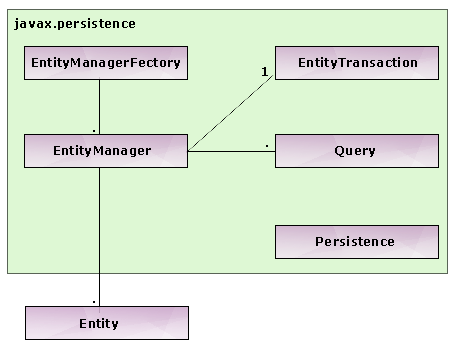
EntityManager in JPA

This class follows the standard Manager Design pattern for managing entities. Managing an entity or a set of entities refers to the act of bring a set of Java objects under the control of EntityManager. Unless entities don’t have any explicit association with EntityManager they are just ordinary java objects (though their corresponding classes have been marked with @Entity annotation).

This EntityManager API provides services for persisting an entity, removing an entity, querying and deleting entities.

In a J2SE application, a reference to an entity manager (EntityManager) can be obtained using the entity manager factory (EntityManagerFactory) and the Persistence class. The persistence class is a helper class (or a bootstrap) used to create EntityManagerFactory objects. With EntityManagerFactory objects, references to EntityManager objects can be obtained. The following code illustrates the same,

EntityManagerFactory entityManagerFactory =  Persistence.createEntityManagerFactory(“PersistentUnitName”);
EntityManager eManager = entityManagerFactory.createEntityManager();


[An EntityManagerFactory can be configured with some set of properties with the help of Persistent Units. Notice that one of the arguments to createEntityManagerFactory() is the name of the persistent unit which is discussed in the later sections.]

In a J2EE application, the container will directly inject a reference to the EntityManager using dependency injection, so the code becomes as simple like this,

@Resource
private EntityManager entityManager;


Persistence Context


To be very precise, a persistent context manages a set of entities which in turn is managed by the EntityManager. A persistent context keeps track of the state (or the changes) that an entity object may undergo. And the EntityManager takes the support of this persistence context to commit or to undo the changes. As soon as an EntityManager object is created, it is implicitly associated with a persistence context for managing a set of entities.

Persistent Context comes in two flavors, one is the transaction-scoped persistent context and the other one is extended persistent context.

Transaction-Scoped Persistence Context: Imagine that a set of entities are managed by the persistence context. At this time, we say that the entities are bound to (or attached) to the persistent context. Changes may happen to these entities and these changes will occur within a transaction. Sometimes later when the transaction ends (commits or roll-back), the entities will unbind (detached) from the persistent context. As soon as the entities are detached from the persistence context, they are no longer being managed. Any changes that happen to these entities will not be persisted as they don’t have any association with the persistence context. Such kind of persistent context whose life-time is dependent on the life-time of the transaction (for a set of entities at that particular point of time) is termed as transaction-scoped persistent context.

All the transaction-scoped persistence context are configured by injecting @PersistentContext to EntityManager objects , like this,

@PersistenceContext(name=”PersistentUnitName”)
private EntityManager entityManager;


[Note: There is no such public interface called PersitenceContext in the Java Persistence API. The EntityManager may implicitly depend on a virtual Persistence Context class for managing the entities. So, creating a transaction-scoped persistence context is nothing but creating an EntityManager object that has been configured with @PersistenceContext annotation.]

Extended Persistence Context: Unlike transaction-scoped persistence context, where the life-time of the persistence context will end as soon the transaction is completed, a persistence context may be configured to live even after a transaction completes. In such a case, all the entities that are managed by such a persistence context will still be in a manageable state only even after the transaction ends. They won’t be detached from the context. Such long-lived persistence context that will continue to exist even after the completion of a transaction is called extended persistence context.

All the extended persistence context objects are created and managed manually by the application code only (that is by the developers).

[As soon as an EntityManager object is created, an implicit Persistence context will be associated with it and it is soon kept open and prepared for managing a set of entities, meaning that the calling EntityManager.isOpen() method will always return true. Calling the EntityManager.clear() method will clear the current persistence context associated with the EntityManager and all the entities that have their associations will now be cleared and they become detached from the EntityManager. To release all the resources referenced by the EntityManager, call the close() method, After this method call, calling any of the methods will throw IllegalStateException.]

Customizing the Entity object in JPA

Changing the default table name

By default the table name corresponds to the unqualified name of the class. We can change this behavior with the help of @Entity annotation itself, like this.


@Entity(name = "MOBILE_ENTITY")
public class MobileEntity{
……
}


Now, the table name becomes MOBILE_ENTITY and this should be the name that must be referred in query strings (Queries are discussed later). The value to the name property must be legal in the sense, it cannot accept any keywords that are found in the query language.


Customizing the Column behaviors


The default name of the columns, their size, whether they can accept null values or not etc., can be customized using the @Column annotation. Following is the sample code that illustrates this,


@Column(name = “MOBILE_MODEL”, nullable = true, length = 35)
private String model;

@Column(name = “MOBILE_MANUFACTURER” nullable = true, length = 100)
private String manufacturer;

@Id
@Column(name = “MOBILE_IMEI_NO”, nullable = false)
private String imeiNo;


The name property, when specified will override the default column name (which is the same as that of the field name in the Entity class). The nullable property tells that whether the column can accept null values. Length property is only applicable if the type of the column is String (or VARCHAR). There are also properties like scale and precision which is applicable only when the type of the column is NUMBER.

[Note, multiple annotations can be legally applied to elements (like class, field, method etc.). In the above example the imeiNo has two annotations attached with it, namely @Id and @Column.]

Auto-generation of Primary Keys


A primary key for an entity which is usually annotated with @Id annotation can be given a value manually or we can depend on the persistence provider for the same. For this we have to use the @GeneratedValue annotation.

Consider the following example,

    @Id
@GeneratedValue(strategy = GenerationType.AUTO)
private String imeiNo;


Since the imeiNo is going to be the primary key for the mobile object, we have decorated the field with @GeneratedValue annotation, which delegates the burden of creating values from developers to the persistence engine. Also, there are 4 different methods (or strategies) for primary key generation, which are AUTO, IDENTITY, SEQUENCE and TABLE. The simplest one is the automatic primary key generation strategy which is represented as GenerationType.AUTO.

[GenerationType is an Enumeration (new feature in Java 5.0) and the four different strategies for primary key generation, namely AUTO, IDENTITY, TABLE and SEQUENCE are defined in that enumeration.]

Thursday, 24 March 2011

JPA Architecture

Java Persistence API or JPA for short is a lightweight, POJO-based Java framework to persist the Java Objects to the relational database. JPA is uses metadata to map the persistence objects with the database table. JPA supports SQL like query language to ease the process of querying the database. JPA Query language can be used to execute both static and dynamic queries.

JPA supports many ORM frameworks available these days. You can use either free or commercial ORM framework in your JPA based applications. It's also very easy to switch to different ORM frameworks.

List of ORM frameworks:

  1. Hibernate
  2. Toplink from oracle
  3. iBatis
  4. Open JPA

You can easily plug any persistence provider into your JPA application.

JPA Concepts

JPA concept includes the three components Entity, EntityManager and EntityManagerFactory. Following diagram shows the primary components of JPA architecture.

Entity

Entity is the persistence (POJO) objects that represent one record in the table. The Entity is simple annoted POJO class, which is easy to develop. Here are the characteristics of an Entity:

  1. Entity can be persisted to the relational database
  2. Entity is identified by persistence identity (the primary key of the table)
  3. Entity supports transactions
  4. Entity supports inheritance

Example consider this class:

class MobileEntity{

private String model;
private String manufacturer;
private Double price;
private String imeiNo;

…..
// Getters and Setters go here.
}


Now to make it an entity, we mark the class with @Entity annotation:


@Entity
class MobileEntity{

private String model;
private String manufacturer;
private Double price;
private String imeiNo;

…..
// Getters and Setters go here.
}


EntityManager

The EntityManager interface is providing the API for interacting with the Entity. Some of the functions provided by EntityManager API are:


  1. persist – this method is used to save a new entity
  2. merge – this method is used to update the sate of entity into database
  3. remove – this method is used to remove the entity instance

You will learn about all these functions in next sections. We have developed many JPA examples to help you in learning JPA.

EntityManagerFactory

The EntityManagerFactory is used to create an instance of EntityManager. In your application when there is no use of EntityManagerFactory or application shuts down then it is necessary to close the instance of EntityManagerFactory . Once the EntityManagerFactory is closed, all its EntityManagers are also closed.

JPA : Overview

The Java Persistence API or JPA is one to the specification of JEE5, which allows the programmer to develop the persistence layer for their desktop and web applications. JPA is developed to ease the development of persistence layer and it has also standardized the Java ORM or Object Relational Mapping technologies.

It provides POJO (Plain Old Java Object) standard and object relational mapping (OR mapping) for data persistence among applications. Persistence, which deals with storing and retrieving of application data, can now be programmed with Java Persistence API starting from EJB 3.0 as a result of JSR 220. This API has borrowed many of the concepts and standards from leading persistence frameworks like Toplink (from Oracle) and Hibernate (from JBoss). One of the great benefits of JPA is that it is an independent API and can nicely integrate with J2EE as well as J2SE applications.

Persistence Entities

Persistent Data normally refers to permanent data in an application. The state of these data is made permanent by storing them in a persistent medium like database, files or a disk tape. In JPA terms, these persistent data are referred as entities. An entity refers to a logical collection of data that can be stored or retrieved as a whole. For example, in a banking application, Customer and BankAccount can be treated as entities. Customer name, customer address etc can be logically grouped together for representing a Customer entity. Similarly account number, total balance etc may be logically grouped under BankAccount entity.

Since entities form the heart of the JPA, they have some unique characteristics like persistability, identity and transactionability. The property of persistability deals with the storing and retrieving of entity from and to a persistent medium like database. Identity property is usually used to identity one unique entity among multiple entities (or multiple entity instances) in a database. All the CRUD operations (Create, Update and Delete) for entity objects will occur within a transactional context and it is one of the major characteristic for an entity object as the real state of an entity depends whether a transaction completes (commits/fails) or not.